Standard regression analysis assumes independent observations and constant effects across subgroups. In practice, these assumptions often fail: observations may be clustered (e.g., subjects within study sites), effects may vary by subgroup (interaction), or the baseline hazard may differ across strata. This vignette demonstrates advanced analytical techniques to address these complexities.
Preliminaries
The examples in this vignette use the clintrial dataset
included with summata:
library(summata)
library(survival)
library(ggplot2)

data(clintrial)
data(clintrial_labels)

# Examine the clustering structure
table(clintrial$site)
##>
##>   Site Alpha    Site Beta   Site Gamma   Site Delta Site Epsilon    Site Zeta     Site Eta   Site Theta    Site Iota   Site Kappa
##>           76           80           72           89           86           93           89           75          102           88
The clintrial dataset includes 10 study sites, providing
a natural clustering variable for hierarchical analysis.
n.b.: The forest plots below are sized by this vignette from each plot’s recommended dimensions, stored in its
"rec_dims"attribute, and rendered via theragggraphics device for correct font metrics. That sizing is applied behind the scenes and is not shown in the code. Writing a plot to file elsewhere is performed withforestsave(), which applies the same dimensions and selects a suitable graphics device:p <- glmforest(model, data = mydata) forestsave(p, "forest_plot.png")This ensures that the figure size is always large enough to accommodate the constituent plot text and graphics, and it is the preferred method for saving forest plot outputs in
summata.
Interaction Effects
Interaction analysis tests whether the association between a
predictor and outcome varies across levels of another variable.
Interactions are specified using colon notation in the
interactions parameter; main effects are automatically
included alongside the interaction term.
Example 1: Two-Way Interaction
Specify interactions using colon notation in the
interactions parameter:
example1 <- fit(
  data = clintrial,
  outcome = "surgery",
  predictors = c("age", "sex", "treatment", "stage"),
  interactions = c("sex:treatment"),
  model_type = "glm",
  labels = clintrial_labels
)

example1
##>
##> Multivariable Logistic Model
##>
##> Formula: surgery ~ age + sex + treatment + stage + sex:treatment
##> Observations analyzed: 847 of 850 (99.6%)
##> Events analyzed: 368 of 370 (99.5%)
##>
##>                                  Variable   Group      n Events     aOR (95% CI) p-value
##>                                    <char>  <char> <char> <char>           <char>  <char>
##>  1:                           Age (years)       -    847    368 0.96 (0.94-0.97) < 0.001
##>  2:                                   Sex  Female    449    203        reference       -
##>  3:                                          Male    398    165 1.01 (0.55-1.87)   0.968
##>  4:                       Treatment Group Control    194     93        reference       -
##>  5:                                        Drug A    292    173 2.09 (1.21-3.64)   0.009
##>  6:                                        Drug B    361    102 0.50 (0.29-0.86)   0.013
##>  7:                         Disease Stage       I    211    125        reference       -
##>  8:                                            II    263    133 0.69 (0.47-1.03)   0.069
##>  9:                                           III    241     91 0.41 (0.27-0.61) < 0.001
##> 10:                                            IV    132     19 0.09 (0.05-0.16) < 0.001
##> 11: Sex (Male) × Treatment Group (Drug A)       -    128     73 0.77 (0.34-1.71)   0.515
##> 12: Sex (Male) × Treatment Group (Drug B)       -    175     49 0.79 (0.36-1.73)   0.554
Example 2: Multiple Interactions
Test multiple effect modifiers simultaneously:
example2 <- fit(
  data = clintrial,
  outcome = "Surv(os_months, os_status)",
  predictors = c("age", "sex", "treatment", "stage"),
  interactions = c("sex:treatment", "stage:treatment"),
  model_type = "coxph",
  labels = clintrial_labels
)

example2
##>
##> Multivariable Cox PH Model
##>
##> Formula: Surv(os_months, os_status) ~ age + sex + treatment + stage + sex:treatment + stage:treatment
##> Observations analyzed: 847 of 850 (99.6%)
##> Events analyzed: 606 of 609 (99.5%)
##>
##>                                           Variable   Group      n Events     aHR (95% CI) p-value
##>                                             <char>  <char> <char> <char>           <char>  <char>
##>  1:                                    Age (years)       -    847    606 1.04 (1.03-1.04) < 0.001
##>  2:                                            Sex  Female    449    297        reference       -
##>  3:                                                   Male    398    309 1.32 (0.95-1.83)   0.094
##>  4:                                Treatment Group Control    194    149        reference       -
##>  5:                                                 Drug A    292    184 0.70 (0.43-1.14)   0.153
##>  6:                                                 Drug B    361    273 0.67 (0.41-1.09)   0.106
##>  7:                                  Disease Stage       I    211    127        reference       -
##>  8:                                                     II    263    172 1.11 (0.73-1.70)   0.624
##>  9:                                                    III    241    186 1.94 (1.21-3.09)   0.006
##> 10:                                                     IV    132    121 3.69 (2.28-5.97) < 0.001
##> 11:          Sex (Male) × Treatment Group (Drug A)       -    128     89 1.11 (0.72-1.72)   0.637
##> 12:          Sex (Male) × Treatment Group (Drug B)       -    175    142 0.98 (0.65-1.46)   0.903
##> 13:  Treatment Group (Drug A) × Disease Stage (II)       -     93     52 0.75 (0.42-1.35)   0.339
##> 14: Treatment Group (Drug A) × Disease Stage (III)       -     75     50 0.65 (0.35-1.20)   0.171
##> 15:  Treatment Group (Drug A) × Disease Stage (IV)       -     46     37 0.70 (0.37-1.34)   0.287
##> 16:  Treatment Group (Drug B) × Disease Stage (II)       -    105     73 1.37 (0.78-2.42)   0.278
##> 17: Treatment Group (Drug B) × Disease Stage (III)       -    127    103 1.30 (0.72-2.35)   0.375
##> 18:  Treatment Group (Drug B) × Disease Stage (IV)       -     55     54 1.24 (0.66-2.31)   0.504
Example 3: Continuous × Categorical Interaction
Test whether effects of a continuous variable vary by group:
example3 <- fit(
  data = clintrial,
  outcome = "los_days",
  predictors = c("age", "sex", "treatment", "stage", "surgery"),
  interactions = c("age:treatment"),
  model_type = "lm",
  labels = clintrial_labels
)

example3
##>
##> Multivariable Linear Model
##>
##> Formula: los_days ~ age + sex + treatment + stage + surgery + age:treatment
##> Observations analyzed: 827 of 850 (97.3%)
##>
##>                                   Variable   Group      n Adj. Coefficient (95% CI) p-value
##>                                     <char>  <char> <char>                    <char>  <char>
##>  1:                            Age (years)       -    827       0.14 (0.09 to 0.19) < 0.001
##>  2:                                    Sex  Female    441                 reference       -
##>  3:                                           Male    386       0.99 (0.46 to 1.52) < 0.001
##>  4:                        Treatment Group Control    190                 reference       -
##>  5:                                         Drug A    288     -2.39 (-6.01 to 1.24)   0.197
##>  6:                                         Drug B    349      0.03 (-3.52 to 3.58)   0.985
##>  7:                          Disease Stage       I    207                 reference       -
##>  8:                                             II    259       1.33 (0.62 to 2.05) < 0.001
##>  9:                                            III    235       3.10 (2.36 to 3.84) < 0.001
##> 10:                                             IV    126       4.32 (3.42 to 5.22) < 0.001
##> 11:                     Surgical Resection      No    459                 reference       -
##> 12:                                            Yes    368       3.29 (2.69 to 3.88) < 0.001
##> 13: Age (years) × Treatment Group (Drug A)       -    288      0.02 (-0.04 to 0.08)   0.557
##> 14: Age (years) × Treatment Group (Drug B)       -    349      0.05 (-0.01 to 0.11)   0.114
Example 4: Interaction in fullfit()
Include interaction terms in combined univariable/multivariable analysis:
example4 <- fullfit(
  data = clintrial,
  outcome = "surgery",
  predictors = c("age", "sex", "treatment", "stage", "sex:treatment"),
  model_type = "glm",
  method = "all",
  labels = clintrial_labels
)

example4
##>
##> Fullfit Analysis Results
##>
##> Outcome: surgery
##> Model Type: glm
##> Method: all
##> Predictors Screened: 5
##> Multivariable Predictors: 5
##> Observations analyzed: 847-850 of 850 (99.6-100.0%)
##> Events analyzed: 368-370 of 370 (99.5-100.0%)
##>
##>                                     Variable   Group      n Events      OR (95% CI)   Uni p     aOR (95% CI) Multi p
##>                                       <char>  <char> <char> <char>           <char>  <char>           <char>  <char>
##>  1:                              Age (years)       -    847    368 0.96 (0.95-0.98) < 0.001 0.96 (0.94-0.97) < 0.001
##>  2:                                      Sex  Female    449    203        reference       -        reference       -
##>  3:                                             Male    398    165 0.86 (0.65-1.12)   0.261 1.01 (0.55-1.87)   0.968
##>  4:                          Treatment Group Control    194     93        reference       -        reference       -
##>  5:                                           Drug A    292    173 1.58 (1.10-2.27)   0.014 2.09 (1.21-3.64)   0.009
##>  6:                                           Drug B    361    102 0.43 (0.30-0.62) < 0.001 0.50 (0.29-0.86)   0.013
##>  7:                            Disease Stage       I    211    125        reference       -        reference       -
##>  8:                                               II    263    133 0.70 (0.49-1.01)   0.060 0.69 (0.47-1.03)   0.069
##>  9:                                              III    241     91 0.42 (0.29-0.61) < 0.001 0.41 (0.27-0.61) < 0.001
##> 10:                                               IV    132     19 0.12 (0.06-0.20) < 0.001 0.09 (0.05-0.16) < 0.001
##> 11: Sex (Female) × Treatment Group (Control)       -    100     51 2.62 (1.58-4.39) < 0.001                -       -
##> 12:   Sex (Male) × Treatment Group (Control)       -     96     43 2.04 (1.22-3.44)   0.007                -       -
##> 13:  Sex (Female) × Treatment Group (Drug A)       -    164    100 3.94 (2.51-6.24) < 0.001                -       -
##> 14:    Sex (Male) × Treatment Group (Drug A)       -    128     73 3.34 (2.08-5.43) < 0.001 0.77 (0.34-1.71)   0.515
##> 15:  Sex (Female) × Treatment Group (Drug B)       -    186     53 1.00 (0.64-1.59)   0.986                -       -
Example 5: Testing Interaction Significance
Use compfit() to formally evaluate whether interactions
improve model fit (see Model
Comparison):
example5 <- compfit(
  data = clintrial,
  outcome = "surgery",
  model_list = list(
    "Main Effects" = c("age", "sex", "treatment", "stage"),
    "Sex × Treatment" = c("age", "sex", "treatment", "stage"),
    "Stage × Treatment" = c("age", "sex", "treatment", "stage"),
    "Both Interactions" = c("age", "sex", "treatment", "stage")
  ),
  interactions_list = list(
    NULL,
    c("sex:treatment"),
    c("stage:treatment"),
    c("sex:treatment", "stage:treatment")
  ),
  model_type = "glm",
  labels = clintrial_labels
)

example5
##>
##> Model Comparison Results
##> Outcome: surgery
##> Model Type: glm
##>
##> CMS Weights:
##>   Convergence: 15%
##>   AIC: 25%
##>   Concordance: 40%
##>   Pseudo-R²: 15%
##>   Brier score: 5%
##>
##> Recommended Model: Main Effects (CMS: 75.4)
##>
##> Models ranked by selection score:
##>                Model   CMS     N Events Predictors Converged   AIC    BIC Pseudo-R² Concordance Brier Score Global p
##>               <char> <num> <int>  <num>      <int>    <char> <num>  <num>     <num>       <num>       <num>   <char>
##> 1:      Main Effects  75.4   847    368          4       Yes 984.4 1022.4     0.165       0.765       0.195  < 0.001
##> 2:   Sex × Treatment  68.6   847    368          4       Yes 987.9 1035.4     0.165       0.765       0.195  < 0.001
##> 3: Stage × Treatment  57.2   847    368          4       Yes 993.8 1060.1     0.167       0.766       0.194  < 0.001
##> 4: Both Interactions  50.6   847    368          4       Yes 997.2 1073.1     0.168       0.766       0.194  < 0.001
##>
##> CMS interpretation: 85+ Excellent, 75-84 Very Good, 65-74 Good, 55-64 Fair, < 55 Poor
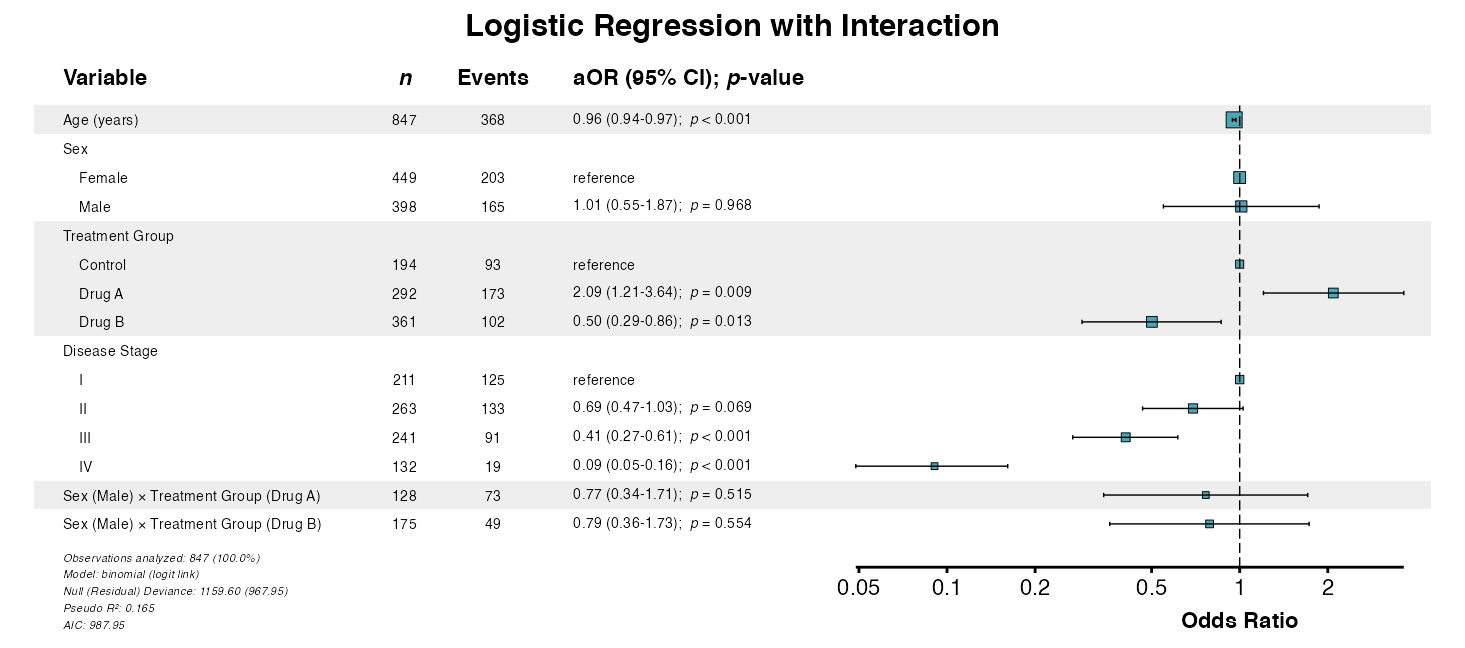
Example 6: Forest Plot with Interactions
Visualize models including interaction terms:
interaction_model <- fit(
  data = clintrial,
  outcome = "surgery",
  predictors = c("age", "sex", "treatment", "stage"),
  interactions = c("sex:treatment"),
  model_type = "glm",
  labels = clintrial_labels
)

example6 <- glmforest(
  x = attr(interaction_model, "model"),
  title = "Logistic Regression with Interaction",
  labels = clintrial_labels,
  indent_groups = TRUE,
  zebra_stripes = TRUE
)
Mixed-Effects Models
Mixed-effects models (multilevel or hierarchical models) account for
correlation within clusters by incorporating random effects. The
summata package supports linear mixed models
(lmer), generalized linear mixed models
(glmer), and Cox mixed models (coxme).
Random effects are specified using pipe notation within either the
predictors parameter or in a separate random
parameter:
| Syntax | Meaning |
|---|---|
(1\|group) |
Random intercepts by group |
(x\|group) |
Random intercepts and slopes for x |
(1\|g1) + (1\|g2) |
Crossed random effects |
Example 7: Random Intercepts (Linear Mixed)
The (1|site) syntax specifies a random intercept for
each site:
example7 <- fit(
  data = clintrial,
  outcome = "los_days",
  predictors = c("age", "sex", "treatment", "stage", "(1|site)"),
  model_type = "lmer",
  labels = clintrial_labels
)

example7
##>
##> Multivariable Linear Mixed Model
##>
##> Formula: los_days ~ age + sex + treatment + stage + (1|site)
##> Observations analyzed: 827 of 850 (97.3%)
##>
##>            Variable   Group      n Adj. Coefficient (95% CI) p-value
##>              <char>  <char> <char>                    <char>  <char>
##>  1:     Age (years)       -    827       0.14 (0.11 to 0.16) < 0.001
##>  2:             Sex  Female    441                 reference       -
##>  3:                    Male    386       0.82 (0.28 to 1.37)   0.003
##>  4: Treatment Group Control    190                 reference       -
##>  5:                  Drug A    288    -0.94 (-1.68 to -0.20)   0.013
##>  6:                  Drug B    349       2.41 (1.70 to 3.13) < 0.001
##>  7:   Disease Stage       I    207                 reference       -
##>  8:                      II    259       1.25 (0.51 to 1.98) < 0.001
##>  9:                     III    235       2.43 (1.67 to 3.19) < 0.001
##> 10:                      IV    126       2.96 (2.07 to 3.85) < 0.001
Example 8: Random Intercepts (Logistic Mixed)
For binary outcomes with clustering (note the use of an independent
random parameter):
example8 <- fit(
    data = clintrial,
    outcome = "surgery",
    predictors = c("age", "sex", "treatment", "stage"),
    random = "(1|site)",
    model_type = "glmer",
    labels = clintrial_labels
)

example8
##>
##> Multivariable glmerMod Model
##>
##> Formula: surgery ~ age + sex + treatment + stage + (1|site)
##> Observations analyzed: 847 of 850 (99.6%)
##> Events analyzed: 368 of 370 (99.5%)
##>
##>            Variable   Group      n Events     aOR (95% CI) p-value
##>              <char>  <char> <char> <char>           <char>  <char>
##>  1:     Age (years)       -    847    368 0.96 (0.94-0.97) < 0.001
##>  2:             Sex  Female    449    203        reference       -
##>  3:                    Male    398    165 0.84 (0.62-1.14)   0.263
##>  4: Treatment Group Control    194     93        reference       -
##>  5:                  Drug A    292    173 1.84 (1.23-2.75)   0.003
##>  6:                  Drug B    361    102 0.45 (0.30-0.66) < 0.001
##>  7:   Disease Stage       I    211    125        reference       -
##>  8:                      II    263    133 0.69 (0.47-1.03)   0.070
##>  9:                     III    241     91 0.41 (0.27-0.62) < 0.001
##> 10:                      IV    132     19 0.09 (0.05-0.17) < 0.001
Example 9: Random Slopes
Allow effects to vary by cluster:
example9 <- fit(
  data = clintrial,
  outcome = "los_days",
  predictors = c("age", "sex", "treatment", "stage", "(1 + treatment|site)"),
  model_type = "lmer",
  labels = clintrial_labels
)

example9
##>
##> Multivariable Linear Mixed Model
##>
##> Formula: los_days ~ age + sex + treatment + stage + (1 + treatment|site)
##> Observations analyzed: 827 of 850 (97.3%)
##>
##>            Variable   Group      n Adj. Coefficient (95% CI) p-value
##>              <char>  <char> <char>                    <char>  <char>
##>  1:     Age (years)       -    827       0.14 (0.11 to 0.16) < 0.001
##>  2:             Sex  Female    441                 reference       -
##>  3:                    Male    386       0.83 (0.28 to 1.38)   0.003
##>  4: Treatment Group Control    190                 reference       -
##>  5:                  Drug A    288    -0.95 (-1.81 to -0.09)   0.031
##>  6:                  Drug B    349       2.40 (1.65 to 3.16) < 0.001
##>  7:   Disease Stage       I    207                 reference       -
##>  8:                      II    259       1.27 (0.53 to 2.00) < 0.001
##>  9:                     III    235       2.44 (1.68 to 3.20) < 0.001
##> 10:                      IV    126       3.01 (2.12 to 3.90) < 0.001
Example 10: Cox Mixed-Effects Model
For survival outcomes with clustering:
example10 <- fit(
  data = clintrial,
  outcome = "Surv(os_months, os_status)",
  predictors = c("age", "sex", "treatment", "stage", "(1|site)"),
  model_type = "coxme",
  labels = clintrial_labels
)

example10
##>
##> Multivariable Mixed Effects Cox Model
##>
##> Formula: Surv(os_months, os_status) ~ age + sex + treatment + stage + (1|site)
##> Observations analyzed: 847
##> Events analyzed: 606
##>
##>            Variable   Group      n Events     aHR (95% CI) p-value
##>              <char>  <char> <char> <char>           <char>  <char>
##>  1:     Age (years)       -    847    606 1.04 (1.03-1.05) < 0.001
##>  2:             Sex  Female    450    298        reference       -
##>  3:                    Male    400    311 1.36 (1.16-1.60) < 0.001
##>  4: Treatment Group Control    196    151        reference       -
##>  5:                  Drug A    292    184 0.57 (0.46-0.72) < 0.001
##>  6:                  Drug B    362    274 0.93 (0.76-1.14)   0.492
##>  7:   Disease Stage       I    211    127        reference       -
##>  8:                      II    263    172 1.17 (0.93-1.48)   0.178
##>  9:                     III    241    186 2.04 (1.62-2.58) < 0.001
##> 10:                      IV    132    121 4.09 (3.16-5.30) < 0.001
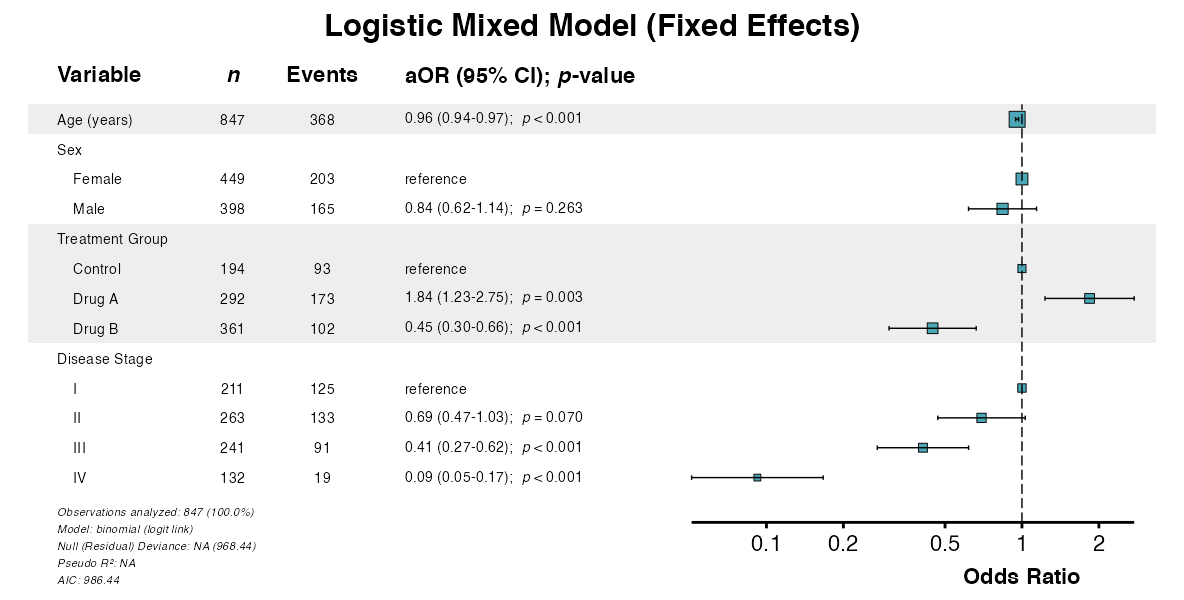
Example 11: Forest Plot from Mixed Model
Visualize fixed effects from mixed-effects models:
example11 <- glmforest(
  x = attr(example8, "model"),
  title = "Logistic Mixed Model (Fixed Effects)",
  labels = clintrial_labels,
  indent_groups = TRUE,
  zebra_stripes = TRUE
)
Example 12: Comparing Random-Effects Specifications
Use compfit() to compare different random-effects
structures (see Model
Comparison):
example12 <- compfit(
  data = clintrial,
  outcome = "los_days",
  model_list = list(
    "Random Intercepts" = c("age", "sex", "treatment", "stage", "(1|site)"),
    "Random Slopes" = c("age", "sex", "treatment", "stage", "(1 + treatment|site)")
  ),
  model_type = "lmer",
  labels = clintrial_labels
)

example12
##>
##> Model Comparison Results
##> Outcome: los_days
##> Model Type: lmer
##>
##> CMS Weights:
##>   Convergence: 20%
##>   AIC: 25%
##>   Marginal R²: 25%
##>   Conditional R²: 15%
##>   ICC: 15%
##>
##> Recommended Model: Random Intercepts (CMS: 74)
##>
##> Models ranked by selection score:
##>                Model   CMS     N Events Predictors Groups Converged    AIC    BIC Pseudo-R² Marginal R² Conditional R²   ICC Concordance Global p
##>               <char> <num> <int>  <num>      <int>  <int>    <char>  <num>  <num>     <num>       <num>          <num> <num>       <num>   <char>
##> 1: Random Intercepts  74.0   827     NA          5     10       Yes 4679.8 4727.0     0.275       0.275          0.330 0.076          NA  < 0.001
##> 2:     Random Slopes  49.1   827     NA          5     10       Yes 4688.5 4759.3     0.276       0.276          0.334 0.098          NA  < 0.001
##>
##> CMS interpretation: 85+ Excellent, 75-84 Very Good, 65-74 Good, 55-64 Fair, < 55 Poor
Stratification and Clustering
In addition to mixed-effects models, Cox models support stratification (separate baseline hazards) and clustered standard errors (robust variance estimation).
| Approach | When to Use |
|---|---|
| Mixed-effects | Model cluster-specific effects; prediction at cluster level |
| Stratification | Proportional hazards assumption violated for a variable |
| Clustered SE | Correlation within clusters; robust inference |
Example 13: Stratified Cox Model
Stratification allows nonproportional hazards across strata without
estimating stratum effects. Use the strata parameter:
example13 <- fit(
  data = clintrial,
  outcome = "Surv(os_months, os_status)",
  predictors = c("age", "sex", "treatment"),
  strata = "site",
  model_type = "coxph",
  labels = clintrial_labels
)

example13
##>
##> Multivariable Cox PH Model
##>
##> Formula: Surv(os_months, os_status) ~ age + sex + treatment + strata( site )
##> Observations analyzed: 850 of 850 (100.0%)
##> Events analyzed: 609 of 609 (100.0%)
##>
##>           Variable   Group      n Events     aHR (95% CI) p-value
##>             <char>  <char> <char> <char>           <char>  <char>
##> 1:     Age (years)       -    850    609 1.04 (1.03-1.04) < 0.001
##> 2:             Sex  Female    450    298        reference       -
##> 3:                    Male    400    311 1.28 (1.09-1.50)   0.003
##> 4: Treatment Group Control    196    151        reference       -
##> 5:                  Drug A    292    184 0.62 (0.50-0.77) < 0.001
##> 6:                  Drug B    362    274 1.00 (0.81-1.22)   0.976
Example 14: Cluster-Robust SEs
For robust inference with correlated observations, cluster-robust
standard errors account for within-cluster correlation. Use the
cluster parameter:
example14 <- fit(
  data = clintrial,
  outcome = "Surv(os_months, os_status)",
  predictors = c("age", "sex", "treatment", "stage"),
  cluster = "site",
  model_type = "coxph",
  labels = clintrial_labels
)

example14
##>
##> Multivariable Cox PH Model
##>
##> Formula: Surv(os_months, os_status) ~ age + sex + treatment + stage
##> Observations analyzed: 847 of 850 (99.6%)
##> Events analyzed: 606 of 609 (99.5%)
##>
##>            Variable   Group      n Events     aHR (95% CI) p-value
##>              <char>  <char> <char> <char>           <char>  <char>
##>  1:     Age (years)       -    847    606 1.04 (1.03-1.04) < 0.001
##>  2:             Sex  Female    449    297        reference       -
##>  3:                    Male    398    309 1.33 (1.19-1.48) < 0.001
##>  4: Treatment Group Control    194    149        reference       -
##>  5:                  Drug A    292    184 0.56 (0.40-0.78) < 0.001
##>  6:                  Drug B    361    273 0.83 (0.63-1.08)   0.167
##>  7:   Disease Stage       I    211    127        reference       -
##>  8:                      II    263    172 1.16 (0.93-1.44)   0.189
##>  9:                     III    241    186 1.90 (1.61-2.23) < 0.001
##> 10:                      IV    132    121 3.57 (2.86-4.46) < 0.001
Weighted Regression
For survey data or inverse probability weighting, use the
weights parameter. Weights can account for sampling design,
non-response, or confounding adjustment.
Example 15: Weighted Analysis
# Create example weights
clintrial$analysis_weight <- runif(nrow(clintrial), 0.5, 2.0)

example15 <- fit(
  data = clintrial,
  outcome = "surgery",
  predictors = c("age", "sex", "treatment", "stage"),
  weights = "analysis_weight",
  model_type = "glm",
  labels = clintrial_labels
)

example15
##>
##> Multivariable Logistic Model
##>
##> Formula: surgery ~ age + sex + treatment + stage
##> Observations analyzed: 847 of 850 (99.6%)
##> Events analyzed: 368 of 370 (99.5%)
##>
##>            Variable   Group      n Events     aOR (95% CI) p-value
##>              <char>  <char> <char> <char>           <char>  <char>
##>  1:     Age (years)       -    847    368 0.96 (0.95-0.98) < 0.001
##>  2:             Sex  Female    449    203        reference       -
##>  3:                    Male    398    165 0.80 (0.61-1.05)   0.109
##>  4: Treatment Group Control    194     93        reference       -
##>  5:                  Drug A    292    173 1.71 (1.19-2.45)   0.004
##>  6:                  Drug B    361    102 0.42 (0.29-0.59) < 0.001
##>  7:   Disease Stage       I    211    125        reference       -
##>  8:                      II    263    133 0.68 (0.48-0.96)   0.028
##>  9:                     III    241     91 0.40 (0.28-0.58) < 0.001
##> 10:                      IV    132     19 0.08 (0.04-0.13) < 0.001
Advanced Univariable Screening Features
The uniscreen() function supports advanced model
specifications including random effects and stratification.
Example 16: Univariable Screening with Random Effects
Screen multiple predictors while accounting for clustering:
example16 <- uniscreen(
  data = clintrial,
  outcome = "surgery",
  predictors = c("age", "sex", "treatment", "stage"),
  model_type = "glmer",
  random = "(1|site)",
  labels = clintrial_labels
)

example16
##>
##> Univariable Screening Results
##>
##> Outcome: surgery
##> Model Type: glmerMod
##> Predictors Screened: 4
##> Significant (p < 0.05): 3
##> Observations analyzed: 847-850 of 850 (99.6-100.0%)
##> Events analyzed: 368-370 of 370 (99.5-100.0%)
##>
##>            Variable   Group      n Events      OR (95% CI) p-value
##>              <char>  <char> <char> <char>           <char>  <char>
##>  1:     Age (years)       -    850    370 0.96 (0.95-0.98) < 0.001
##>  2:             Sex  Female    450    204        reference       -
##>  3:                    Male    400    166 0.85 (0.65-1.12)   0.256
##>  4: Treatment Group Control    196     94        reference       -
##>  5:                  Drug A    292    173 1.57 (1.09-2.27)   0.016
##>  6:                  Drug B    362    103 0.43 (0.30-0.62) < 0.001
##>  7:   Disease Stage       I    211    125        reference       -
##>  8:                      II    263    133 0.72 (0.50-1.04)   0.080
##>  9:                     III    241     91 0.42 (0.29-0.61) < 0.001
##> 10:                      IV    132     19 0.12 (0.07-0.20) < 0.001
Example 17: Cox Screening with Mixed Effects
For survival outcomes with clustering:
example17 <- uniscreen(
  data = clintrial,
  outcome = "Surv(os_months, os_status)",
  predictors = c("age", "sex", "treatment", "stage", "ecog"),
  model_type = "coxme",
  random = "(1|site)",
  labels = clintrial_labels
)

example17
##>
##> Univariable Screening Results
##>
##> Outcome: Surv(os_months, os_status)
##> Model Type: Mixed Effects Cox
##> Predictors Screened: 5
##> Significant (p < 0.05): 5
##> Observations analyzed: 842-850 of 850 (99.1-100.0%)
##> Events analyzed: 602-609 of 609 (98.9-100.0%)
##>
##>                    Variable   Group      n Events      HR (95% CI) p-value
##>                      <char>  <char> <char> <char>           <char>  <char>
##>  1:             Age (years)       -    850    609 1.04 (1.03-1.04) < 0.001
##>  2:                     Sex  Female    450    298        reference       -
##>  3:                            Male    400    311 1.30 (1.11-1.53)   0.001
##>  4:         Treatment Group Control    196    151        reference       -
##>  5:                          Drug A    292    184 0.65 (0.53-0.81) < 0.001
##>  6:                          Drug B    362    274 1.04 (0.85-1.27)   0.735
##>  7:           Disease Stage       I    211    127        reference       -
##>  8:                              II    263    172 1.13 (0.90-1.42)   0.307
##>  9:                             III    241    186 1.78 (1.41-2.23) < 0.001
##> 10:                              IV    132    121 3.63 (2.81-4.69) < 0.001
##> 11: ECOG Performance Status       0    265    159        reference       -
##> 12:                               1    302    212 1.31 (1.07-1.62)   0.010
##> 13:                               2    238    194 1.92 (1.56-2.37) < 0.001
##> 14:                               3     37     37 2.95 (2.05-4.24) < 0.001
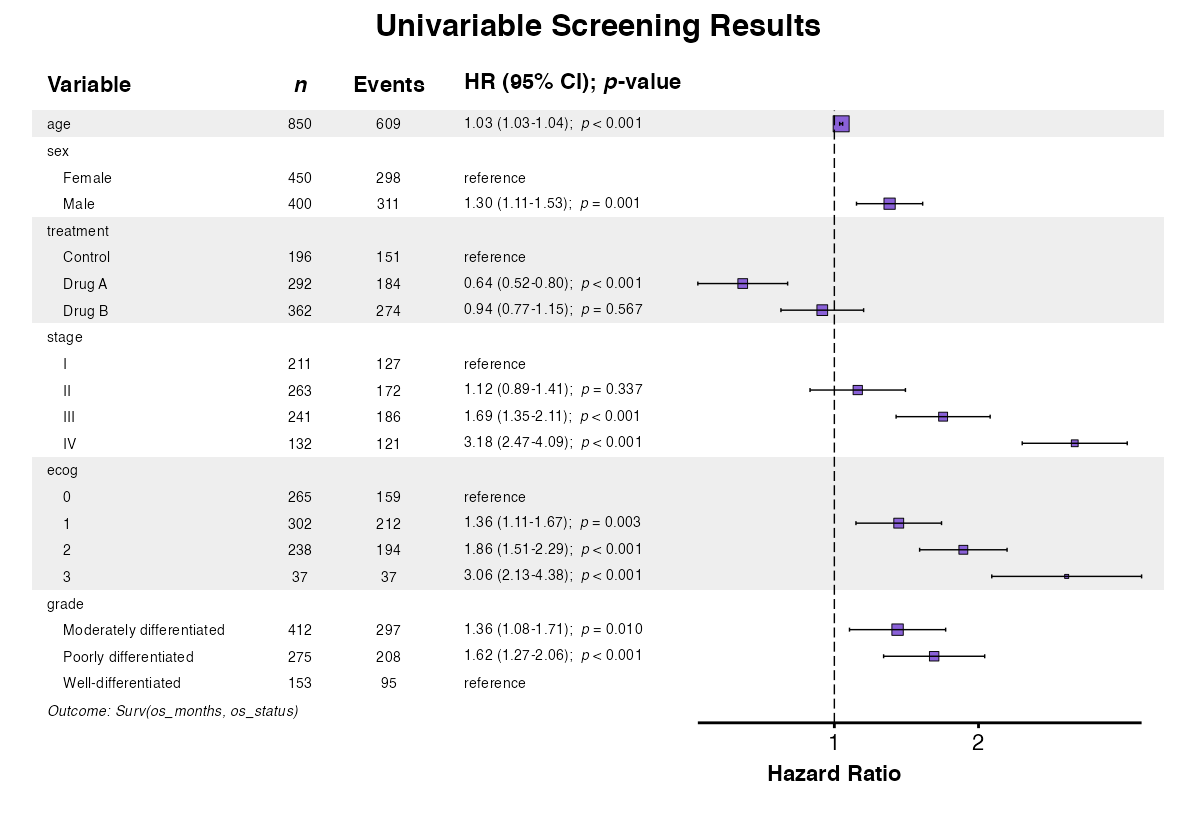
Example 18: Forest Plot from Univariable Screening
The uniforest() function visualizes univariable
screening results. Labels supplied to uniscreen() are
carried through automatically, and may also be given directly:
uni_results <- uniscreen(
  data = clintrial,
  outcome = "Surv(os_months, os_status)",
  predictors = c("age", "sex", "treatment", "stage", "ecog", "grade"),
  model_type = "coxph",
  labels = clintrial_labels
)

example18 <- uniforest(
  uni_results,
  title = "Univariable Screening Results",
  labels = clintrial_labels,
  indent_groups = TRUE,
  zebra_stripes = TRUE
)
Advanced Multivariate Regression Features
The multifit() function supports interactions and
mixed-effects models when testing a predictor across multiple
outcomes.
Example 19: Multi-Outcome with Interactions
Test effect modification across multiple outcomes:
example19 <- multifit(
  data = clintrial,
  outcomes = c("surgery", "pfs_status", "os_status"),
  predictor = "treatment",
  covariates = c("age", "sex", "stage"),
  interactions = c("treatment:sex"),
  labels = clintrial_labels,
  parallel = FALSE
)

example19
##>
##> Multivariate Regression Results
##>
##> Predictor: treatment
##> Outcomes: 3
##> Model Type: glm
##> Covariates: age, sex, stage
##> Interactions: treatment:sex
##> Display: adjusted
##> Observations analyzed: 847 of 850 (99.6%)
##>
##>                        Outcome                             Predictor      n Events     aOR (95% CI) p-value
##>                         <char>                                <char> <char> <char>           <char>  <char>
##>  1:         Surgical Resection              Treatment Group (Drug A)    292    173 2.09 (1.21-3.64)   0.009
##>  2:         Surgical Resection              Treatment Group (Drug B)    361    102 0.50 (0.29-0.86)   0.013
##>  3:         Surgical Resection Treatment Group (Drug A) × Sex (Male)      -      - 0.77 (0.34-1.71)   0.515
##>  4:         Surgical Resection Treatment Group (Drug B) × Sex (Male)      -      - 0.79 (0.36-1.73)   0.554
##>  5: Progression or Death Event              Treatment Group (Drug A)    292    227 0.41 (0.19-0.82)   0.015
##>  6: Progression or Death Event              Treatment Group (Drug B)    361    321 0.95 (0.42-2.07)   0.893
##>  7: Progression or Death Event Treatment Group (Drug A) × Sex (Male)      -      - 0.75 (0.24-2.29)   0.618
##>  8: Progression or Death Event Treatment Group (Drug B) × Sex (Male)      -      - 0.63 (0.19-2.04)   0.448
##>  9:                Death Event              Treatment Group (Drug A)    292    184 0.39 (0.22-0.70)   0.002
##> 10:                Death Event              Treatment Group (Drug B)    361    273 0.61 (0.34-1.09)   0.099
##> 11:                Death Event Treatment Group (Drug A) × Sex (Male)      -      - 1.29 (0.52-3.17)   0.575
##> 12:                Death Event Treatment Group (Drug B) × Sex (Male)      -      - 1.59 (0.65-3.90)   0.308
Example 20: Multi-Outcome with Mixed Effects
Account for clustering when testing effects across outcomes:
example20 <- multifit(
  data = clintrial,
  outcomes = c("surgery", "pfs_status"),
  predictor = "treatment",
  covariates = c("age", "sex"),
  random = "(1|site)",
  model_type = "glmer",
  labels = clintrial_labels,
  parallel = FALSE
)

example20
##>
##> Multivariate Regression Results
##>
##> Predictor: treatment
##> Outcomes: 2
##> Model Type: glmer
##> Covariates: age, sex
##> Random Effects: (1|site)
##> Display: adjusted
##> Observations analyzed: 850 of 850 (100.0%)
##>
##>                       Outcome                Predictor      n Events     aOR (95% CI) p-value
##>                        <char>                   <char> <char> <char>           <char>  <char>
##> 1:         Surgical Resection Treatment Group (Drug A)    292    173 1.64 (1.13-2.40)   0.010
##> 2:         Surgical Resection Treatment Group (Drug B)    362    103 0.44 (0.30-0.63) < 0.001
##> 3: Progression or Death Event Treatment Group (Drug A)    292    227 0.41 (0.24-0.71)   0.001
##> 4: Progression or Death Event Treatment Group (Drug B)    362    322 1.01 (0.58-1.78)   0.971
Example 21: Survival Multi-Outcome with Mixed Effects
For multiple survival outcomes with clustering:
example21 <- multifit(
  data = clintrial,
  outcomes = c("Surv(pfs_months, pfs_status)",
               "Surv(os_months, os_status)"),
  predictor = "treatment",
  covariates = c("age", "sex"),
  random = "(1|site)",
  model_type = "coxme",
  labels = clintrial_labels,
  parallel = FALSE
)

example21
##>
##> Multivariate Regression Results
##>
##> Predictor: treatment
##> Outcomes: 2
##> Model Type: coxme
##> Covariates: age, sex
##> Random Effects: (1|site)
##> Display: adjusted
##> Observations analyzed: 850 of 850 (100.0%)
##>
##>                               Outcome                Predictor      n Events     aHR (95% CI) p-value
##>                                <char>                   <char> <char> <char>           <char>  <char>
##> 1: Progression-Free Survival (months) Treatment Group (Drug A)    723    723 0.63 (0.51-0.77) < 0.001
##> 2: Progression-Free Survival (months) Treatment Group (Drug B)    723    723 1.00 (0.83-1.20)   0.989
##> 3:          Overall Survival (months) Treatment Group (Drug A)    609    609 0.63 (0.50-0.78) < 0.001
##> 4:          Overall Survival (months) Treatment Group (Drug B)    609    609 1.00 (0.82-1.23)   0.962
Complete Workflow Example
The following demonstrates a complete advanced analysis workflow:
# Step 1: Screen risk factors for primary outcome
risk_screening <- uniscreen(
  data = clintrial,
  outcome = "os_status",
  predictors = c("age", "sex", "bmi", "smoking", "diabetes",
                 "hypertension", "stage", "ecog", "treatment"),
  model_type = "glm",
  p_threshold = 0.20,
  labels = clintrial_labels
)

risk_screening
##>
##> Univariable Screening Results
##>
##> Outcome: os_status
##> Model Type: Logistic
##> Predictors Screened: 9
##> Significant (p < 0.2): 6
##> Observations analyzed: 833-850 of 850 (98.0-100.0%)
##> Events analyzed: 594-609 of 609 (97.5-100.0%)
##>
##>                    Variable   Group      n Events                                                                         OR (95% CI) p-value
##>                      <char>  <char> <char> <char>                                                                              <char>  <char>
##>  1:             Age (years)       -    850    609                                                                    1.05 (1.03-1.06) < 0.001
##>  2:                     Sex  Female    450    298                                                                           reference       -
##>  3:                            Male    400    311                                                                    1.78 (1.31-2.43) < 0.001
##>  4: Body Mass Index (kg/m²)       -    838    599                                                                    1.01 (0.98-1.05)   0.347
##>  5:          Smoking Status   Never    337    248                                                                           reference       -
##>  6:                          Former    311    203                                                                    0.67 (0.48-0.94)   0.022
##>  7:                         Current    185    143                                                                    1.22 (0.81-1.87)   0.351
##>  8:                Diabetes      No    637    457                                                                           reference       -
##>  9:                             Yes    197    138                                                                    0.92 (0.65-1.31)   0.646
##> 10:            Hypertension      No    504    354                                                                           reference       -
##> 11:                             Yes    331    242                                                                    1.15 (0.85-1.57)   0.369
##> 12:           Disease Stage       I    211    127                                                                           reference       -
##> 13:                              II    263    172                                                                    1.25 (0.86-1.82)   0.243
##> 14:                             III    241    186                                                                    2.24 (1.49-3.38) < 0.001
##> 15:                              IV    132    121                                                                   7.28 (3.85-15.04) < 0.001
##> 16: ECOG Performance Status       0    265    159                                                                           reference       -
##> 17:                               1    302    212                                                                    1.57 (1.11-2.23)   0.011
##> 18:                               2    238    194                                                                    2.94 (1.96-4.46) < 0.001
##> 19:                               3     37     37 10434240.53 (0.14-2890457677984913571851268084302912518873843036449866285842432.00)   0.967
##> 20:         Treatment Group Control    196    151                                                                           reference       -
##> 21:                          Drug A    292    184                                                                    0.51 (0.34-0.76)   0.001
##> 22:                          Drug B    362    274                                                                    0.93 (0.61-1.39)   0.721
##>                    Variable   Group      n Events                                                                         OR (95% CI) p-value
##>                      <char>  <char> <char> <char>                                                                              <char>  <char>

# Step 2: Test key exposure across multiple outcomes
effects <- multifit(
  data = clintrial,
  outcomes = c("surgery", "pfs_status", "os_status"),
  predictor = "treatment",
  covariates = c("age", "sex", "stage"),
  columns = "both",
  labels = clintrial_labels,
  parallel = FALSE
)

effects
##>
##> Multivariate Regression Results
##>
##> Predictor: treatment
##> Outcomes: 3
##> Model Type: glm
##> Covariates: age, sex, stage
##> Display: both
##> Observations analyzed: 847 of 850 (99.6%)
##>
##>                       Outcome                Predictor      n Events      OR (95% CI)   Uni p     aOR (95% CI) Multi p
##>                        <char>                   <char> <char> <char>           <char>  <char>           <char>  <char>
##> 1:                Death Event Treatment Group (Drug A)    292    184 0.51 (0.34-0.76)   0.001 0.44 (0.28-0.68) < 0.001
##> 2:                Death Event Treatment Group (Drug B)    361    273 0.93 (0.61-1.39)   0.721 0.74 (0.47-1.16)   0.192
##> 3: Progression or Death Event Treatment Group (Drug A)    292    227 0.44 (0.26-0.73)   0.002 0.36 (0.20-0.62) < 0.001
##> 4: Progression or Death Event Treatment Group (Drug B)    361    321 1.02 (0.58-1.75)   0.950 0.77 (0.42-1.36)   0.374
##> 5:         Surgical Resection Treatment Group (Drug A)    292    173 1.58 (1.10-2.27)   0.014 1.84 (1.23-2.76)   0.003
##> 6:         Surgical Resection Treatment Group (Drug B)    361    102 0.43 (0.30-0.62) < 0.001 0.45 (0.30-0.66) < 0.001

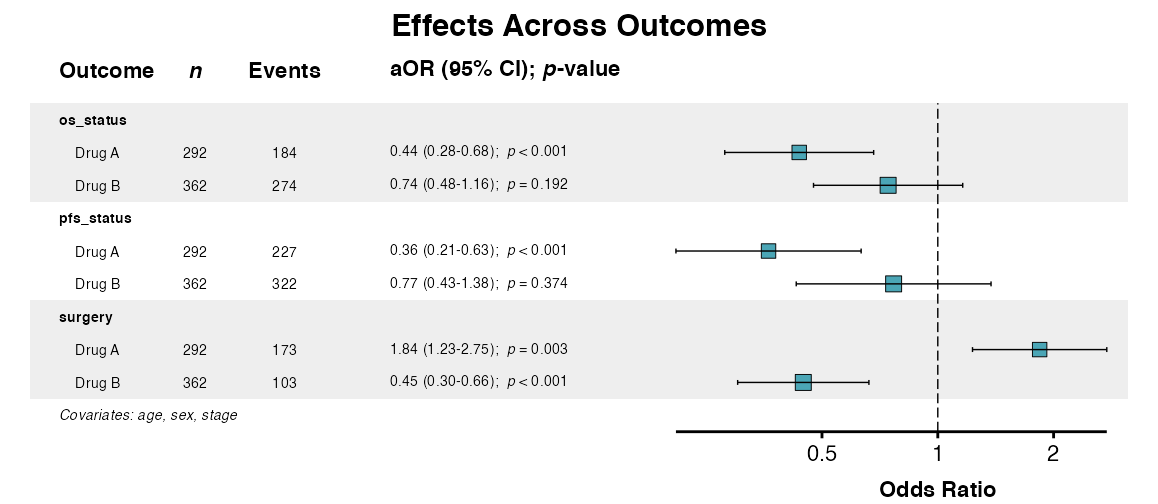
# Step 3: Visualize effects
forest_plot <- multiforest(
  effects,
  title = "Effects Across Outcomes",
  labels = clintrial_labels,
  indent_predictor = TRUE,
  zebra_stripes = TRUE
)
Best Practices
Interaction Analysis
- Include main effects for all variables in interactions
- Test formally using interaction p-values
- Non-significant interactions do not prove effect homogeneity
- Consider domain plausibility when interpreting
Mixed-Effects Models
- Use when data exhibits natural clustering
- Start with random intercepts; add random slopes if justified
- Monitor convergence; simplify if necessary
- Compare to fixed-effects models using
compfit()
Common Issues
Convergence Problems in Mixed Models
Simplify the random effects structure if convergence fails:
# Start with random intercepts only
fit(data, outcome, c(predictors, "(1|site)"), model_type = "lmer")
Check for common problems such as few observations per cluster, near-zero variance in random effects, or highly correlated predictors.
Further Reading
-
Descriptive Tables:
desctable()for baseline characteristics -
Regression Modeling:
uniscreen(),fit(), andfullfit() -
Model Comparison:
compfit()for comparing models - Table Export: Export to PDF, Word, and other formats
- Forest Plots: Visualization of regression results
-
Multivariate Regression:
multifit()for multi-outcome analysis